


Luxer One
3.11.72K Reviews
App Specs
- Version
- 6.0.15
- Updated On
- License
- Free
- Downloads
- 500,000+
- Developer
- Luxer One
- Categories
- Lifestyle
- Platform
- Android
Screenshots

 Analysis by AppCompare
When a package arrives at a building with a Luxer One locker, the useful part is not simply having another place to collect it. The real advantage is that the handoff moves away from a crowded front desk or an uncertain doorstep and into a dedicated pickup routine. I found that shift more valuable than I expected, especially on days when I was not home or did not want to coordinate with staff.
Luxer One is a free lifestyle app from Luxer One focused on package pickup. Its job is narrow, and that is a strength: it is built around helping residents manage deliveries connected to Luxer One lockers rather than trying to become a general shopping, parcel comparison, or courier app. The service has been available since October 2, 2019, and the current version is 6.0.15 for devices running iOS or Android 12 and newer.
The app has an average rating of 3.2 from around 4.5 thousand ratings, with roughly 1.7 thousand written reviews. That mixed reception makes sense to me. The experience can feel wonderfully simple when the property’s locker setup and delivery information are working properly, but the app is not a magic fix for a package that was sent to the wrong place, has not been processed, or is tied to an account problem.
Why the locker pickup capability matters
The central capability is controlled access to a package locker. Instead of treating delivery as a single moment at your door, Luxer One turns it into a two-step process: the carrier leaves the parcel in the building’s designated system, and I retrieve it when it suits me. That distinction is especially helpful in apartments, student housing, offices, and other places where unattended packages can be awkward or risky.
In ordinary use, the app acts as the resident-facing part of that arrangement. It gives the pickup process a digital starting point, while the physical locker remains the place where the parcel is collected. I like this division because it keeps the app’s purpose clear. I am not browsing a feed or managing a complicated delivery calendar; I am trying to get one package from a secure location into my hands.
That sounds modest, but it changes the pressure around delivery. A doorstep drop-off asks me to be available at a particular time, while a staffed reception desk may involve opening hours, queues, or someone else signing for the item. A locker-based pickup gives me more control over the final step. The benefit is greatest when my schedule is unpredictable or when I regularly receive items while away from home.
There is also a useful psychological difference. With a doorstep delivery, I may wonder whether the package is still outside, hidden from view, or vulnerable to weather and passing foot traffic. With a locker pickup, the next action is clearer: open the app, check the delivery status, go to the locker area, and collect it. That clarity is the capability’s real effect in daily life.
Worth Reading Before You Choose

EA SPORTS FC Mobile 26 Is a Bigger Football Game, but It Takes Time

Flipboard Shows What News Apps Must Do Beyond the Feed

Switching to Android Auto Means Rethinking Your Driving Routine

Google Calendar Makes a Crowded Week Easier to Manage

Ludo King Makes the Most of the Minutes Between Plans

Baby Panda World Brings Quick Play to Modern Phones, but Its Game Library Feels Busy
What I do before relying on it
I would not install the app and assume every delivery will automatically appear. The first practical step is confirming that the building or workplace actually uses Luxer One and that the delivery address is entered exactly as the property expects. A small mismatch in a unit number, resident detail, or delivery instruction can create more frustration than the app itself.
I also recommend treating the app as part of a chain rather than the entire chain. The retailer, carrier, property management team, locker system, and resident all play a role. If the carrier has not delivered the parcel to the locker, there is nothing the app can do to create a pickup. This is an important expectation to set before blaming the software for a delay that happened earlier.
For a first-time user, it helps to identify the physical locker location before an urgent delivery arrives. Some buildings place lockers near a lobby, while others use a separate entrance or a less obvious room. Knowing where to go saves time, and it also makes the first pickup less confusing if the app notification arrives while I am between errands.
How the pickup routine feels in practice
My preferred workflow is simple. I check the app when I receive a delivery alert, read the available pickup information, and wait until I am actually ready to visit the locker area. I do not make a special trip for every parcel unless I need it immediately. The value comes from fitting collection into a normal routine: returning from work, leaving for class, taking out the trash, or passing through the lobby.
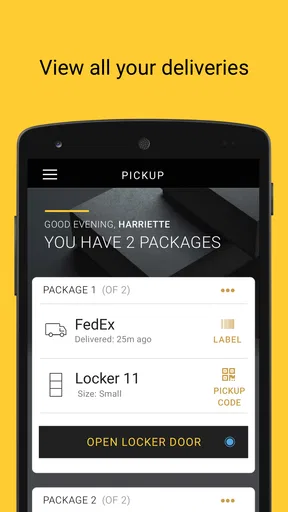
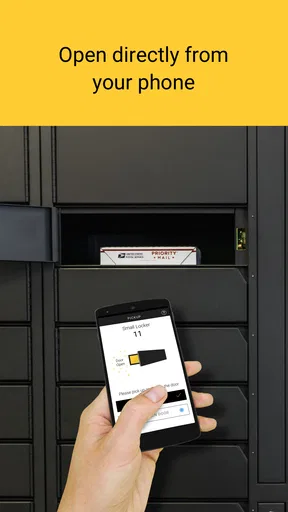
At the locker, I use the app as the digital key to the next step rather than searching through emails or trying to remember a code from a message. That is a small improvement, but it matters when I have several delivery notifications in different inboxes. Keeping the pickup interaction in one place reduces the chance of arriving without the information I need.
One non-obvious tip is to open the app before walking to the locker room, not after arriving there. If I discover that I need to sign in again or that the relevant delivery information is not immediately visible, I can solve the issue while I still have time and a stable connection. This avoids standing in a hallway with a phone in one hand and a crowded schedule in the other.
Another useful habit is to collect packages in batches when the timing allows it. If two deliveries are ready, one visit is more efficient than treating them as separate errands. This is where a locker system can beat a front desk: I am not asking staff to retrieve multiple items one by one, and I can organize the pickup around my own route.
The app is most satisfying when the property’s process is consistent. A clear notification, an accessible locker area, and a package that is ready when expected make the whole experience feel nearly invisible. When one of those pieces breaks, the narrow focus becomes more apparent because there are not many other things the app can do for me.
A realistic everyday scenario
Imagine I am working a long day and ordering a household item that I do not want left outside my apartment. The delivery arrives while I am away. Instead of asking a neighbor to watch for it or hoping the parcel remains untouched, I receive the pickup information through the Luxer One process. On my way home, I stop at the locker area, use the app, collect the item, and continue upstairs.
The important detail is not that this saves an enormous amount of time. It is that it removes several small decisions: whether to stay home, whether to contact reception, whether to ask a neighbor, and whether the package is safe at the door. For people who receive deliveries regularly, removing those decisions can make the app worthwhile even when each individual pickup takes only a short while.
A different scenario shows the limitation. If I am expecting a temperature-sensitive item, a very large parcel, or something that requires a special delivery arrangement, I would not automatically assume the locker is suitable. The app is designed around package pickup, but the delivery’s size, handling needs, and property rules still matter. In that situation, a retailer’s delivery instructions or a direct carrier arrangement may be the better option.
Where Luxer One is better than ordinary alternatives
Compared with a doorstep drop-off, the locker approach gives me a more deliberate collection point. It is particularly useful in shared buildings where entrances are busy or where I am uncomfortable with packages being visible outside my door. Compared with a staffed desk, it can offer more independence because I do not need to wait for a person to locate the parcel.
Compared with relying only on carrier notifications, the app provides a property-specific pickup experience. Carrier tracking can tell me where a parcel is in transit, but it does not necessarily make the final handoff convenient. Luxer One becomes useful after the delivery reaches the building’s locker process, when the question changes from “Where is my package?” to “How do I collect it?”
There is a trade-off against a simple doorstep delivery: I have to make a trip to the locker area. For someone who works from home, lives in a small building, and feels comfortable with packages outside the door, that extra step may not be worth it. The locker is most valuable when security, access, or schedule flexibility matters more than maximum convenience at the apartment door.
The friction points I noticed
The app’s narrow purpose means its success depends heavily on circumstances outside the screen. A delayed carrier scan, an incorrectly addressed shipment, a full or unavailable locker, or a property-level issue can interrupt the experience. In those moments, I may need to contact the retailer, carrier, or building management rather than keep retrying the app.
The rating of 3.2 suggests that not every user finds the process smooth. I would interpret that as a reason to keep expectations practical, not as proof that the app is unusable. A locker application can feel excellent when the user is properly registered and the building’s workflow is reliable, yet disappointing when the account, address, or delivery record does not line up.
Another trade-off is dependence on a compatible building. This is not a universal parcel manager that I can use for any address. Its usefulness follows the property’s relationship with Luxer One. Before making it part of my delivery habits, I would verify that my residence or workplace supports the system and learn how management expects residents to use it.
I would also avoid treating the app as a substitute for tracking a valuable or time-critical shipment. For important purchases, I still check the retailer or carrier’s status because the locker app represents the pickup stage, not necessarily every movement before arrival. That layered approach gives me better information than depending on one notification alone.
Small habits that make the system easier
I keep my delivery details consistent across retailers, especially the unit information used by my building. I also check the app when I have enough time to complete the pickup rather than opening it casually and assuming the package will remain convenient forever. These habits are not glamorous, but they prevent avoidable confusion.
If a notification does not match what I expected, I compare the item description and delivery timing with the retailer’s order record before visiting the locker. That quick check helps distinguish a genuine ready-for-pickup message from a delivery that is still moving through the carrier network. It is a better workflow than making a trip based on a vague assumption.
For shared households, I would agree in advance on who collects packages and how pickup information is handled. The app is most useful when the person arriving at the locker has the correct account access and knows which parcel to retrieve. A little coordination avoids the awkward situation where one resident sees the notification but another is the person actually passing the locker area.
Who will gain the most from it
The best fit is someone whose delivery problem is access, not shopping. I would recommend Luxer One to apartment residents who are frequently away during delivery hours, people who prefer not to leave packages outdoors, and workers or students whose buildings use the system as a regular delivery point. It also makes sense for anyone who wants to combine package collection with an existing trip through the lobby or common area.
The app is less compelling for someone who rarely receives parcels, lives in a place with dependable secure doorstep delivery, or dislikes making any extra trip after a delivery arrives. It is also not the first choice for users who need broad carrier management, detailed shipment comparison, or a single dashboard for many unrelated delivery services. A carrier’s own application may be better for tracking a parcel across its entire journey.
Because the app is free and rated for Everyone, trying it carries little financial risk, but the real question is whether the surrounding locker service fits my building. I would judge it by the complete routine: Is the locker easy to reach? Are deliveries normally deposited correctly? Can I collect items at times that suit me? If the answers are yes, the app can remove a surprising amount of delivery hassle.
My final take on the pickup experience
Luxer One does one job rather than pretending to solve every delivery problem, and I think that focus is its clearest strength. When a package is already headed to a compatible locker, the app can make the final handoff more orderly, private, and flexible than a doorstep drop-off or a staffed desk.
It is not a replacement for carrier tracking, retailer support, or building management, and it cannot repair a delivery problem that happened before the locker stage. Still, for the right resident, that limitation is acceptable because the app addresses a specific daily annoyance: getting a package safely and conveniently after it reaches the property.
With over 500 thousand installs, it is clearly used by a substantial group of residents, although the mixed average rating tells me to approach it with realistic expectations. I would recommend giving it a try when my building supports Luxer One and my main concern is missed deliveries or exposed packages. If my building does not use the system, or if doorstep delivery already works perfectly for me, there is little reason to change. For everyone in between, the free app is worth evaluating as a practical pickup tool, not as a complete delivery-management solution.
Pros
- Convenient mobile access to package lockers and delivery notifications.
- Pickup codes and locker details are easy to find in the app.
- Supports contactless package retrieval at participating properties.
- Useful delivery history helps track previously collected packages.
- Clean interface makes routine package management straightforward.
Cons
- Features depend heavily on whether your property supports Luxer One.
- Push notifications may be delayed by phone settings or network issues.
- Locker availability can be limited during busy delivery periods.
- Some users may need to contact property staff for account problems.
- The app offers little value if you rarely receive locker deliveries.
FAQs for Luxer One
What is Luxer One and how does it work?
Luxer One is a package management service that helps apartment residents, students, and employees receive deliveries securely. Packages are placed in a Luxer One locker or package room by a participating carrier or property staff member. You typically receive an email or text notification with instructions, then use a pickup code, QR code, or account access to retrieve the parcel.
Do I need an invitation or property that supports Luxer One?
Yes. Luxer One is generally available only through properties, campuses, workplaces, or communities that have installed the service. You normally need to be registered by your property manager or receive a delivery notification connected to your address. Downloading the app alone does not guarantee access, so confirm that your building or organization supports Luxer One before creating an account.
How do I pick up a package using the Luxer One app?
After your package is delivered, Luxer One usually sends a notification containing pickup information. At the locker, you may scan a QR code, enter a pickup code, or sign in through the app, depending on the location’s setup. Follow the on-screen directions, open the assigned compartment, remove your package, and close the door securely.
Are there fees or storage limits for packages?
Potential fees and storage rules depend on the property or organization operating the Luxer One system. Some locations offer a free pickup period, while others may charge a fee when packages remain uncollected for too long. Locker capacity and package size limits can also apply. Check your delivery notice or ask property management about local policies.
What should I do if I cannot find my package or the locker will not open?
First, verify the delivery notification, pickup code, recipient name, and locker location, since a package may have been placed in a package room or managed by staff instead. If the code fails or the compartment does not open, avoid forcing the door and use the app’s support options. You can also contact your property manager or Luxer One support with the tracking details.


